Every twelve months inbox laws mutate – new headers, new caps, new black-box metrics. The bad news? What passed in 2024 can flat-line in 2025.
The good news: deliverability is a solvable game of iteration. Below is the exact playbook we run across all our segments – agencies, clients, and our specialist unit we are running, HiveHCleaning – plus the safeguards we’ll tweak the moment next year’s rules land.
1 | Why Big Mailbox Providers Tightened the Screws
Remember 2017’s wild-west cold email? Spray 5,000 messages, land in 4,700 inboxes, book a call, move on.
Fast-forward to 2024-25: Google, Yahoo, Microsoft raise the drawbridge.
- Feb 2024 – Gmail: mandatory SPF + DKIM, List-Unsubscribe header, spam-rate ≤ 0.3 %.
- Mar 2024 – Yahoo: “me too” policy.
- Jan 2025 – Outlook / Microsoft 365: SPF alignment and DKIM strongly urged, junk-folder enforcement at the same 0.3 % line.
Translation for senders
The rules will tighten again. Treat deliverability as ongoing problem-solving.
2 | Gmail, Outlook & Yahoo Requirements at a Glance
| Provider | Auth must-haves | One-click unsub? | Complaint cap | Live since |
| Gmail | SPF + DKIM (DMARC encouraged) | ✅ | ≤ 0.3 % | Feb 2024 |
| Yahoo | SPF + DKIM (DMARC encouraged) | ✅ | ≤ 0.3 % | Mar 2024 |
| Outlook / M365 | SPF aligned, DKIM “highly recommended”, DMARC suggested | Coming | ≤ 0.3 % junk | Jan 2025 |
Move now: even if DMARC isn’t “mandatory,” a p=quarantine policy already raises your reputation scores.
3 | The Three Pillars of Authentication

Authentication Pillars Interactive Tool
Explore the three pillars of email authentication with step-by-step guides and easy record generators.
Sender Policy Framework (SPF)
DomainKeys Identified Mail (DKIM)
2. Navigate to Authentication or Security settings
3. Generate new DKIM key with 2048-bit length
4. Copy the provided TXT record to your DNS
5. Verify setup using the test tools below
Domain-based Message Authentication, Reporting & Conformance
Trusted Record Generators & Validators
Pro tip: build the record in a wizard, publish in Cloudflare/Route 53, then re-check with a second tool to catch typos.
4 | Two-Phase Warm-Up Blueprint
Email Volume Calculator
Calculate how many inboxes you should rotate based on your daily cold email volume.
You’re within the safe zone for a single inbox. Monitor your spam rate to stay below 0.2%.
Based on the rule of thumb: Cap real sends at 25/day per inbox.
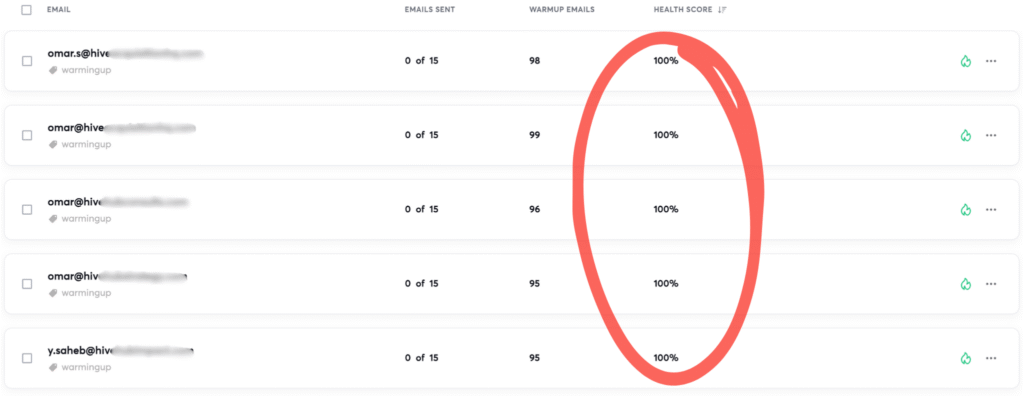
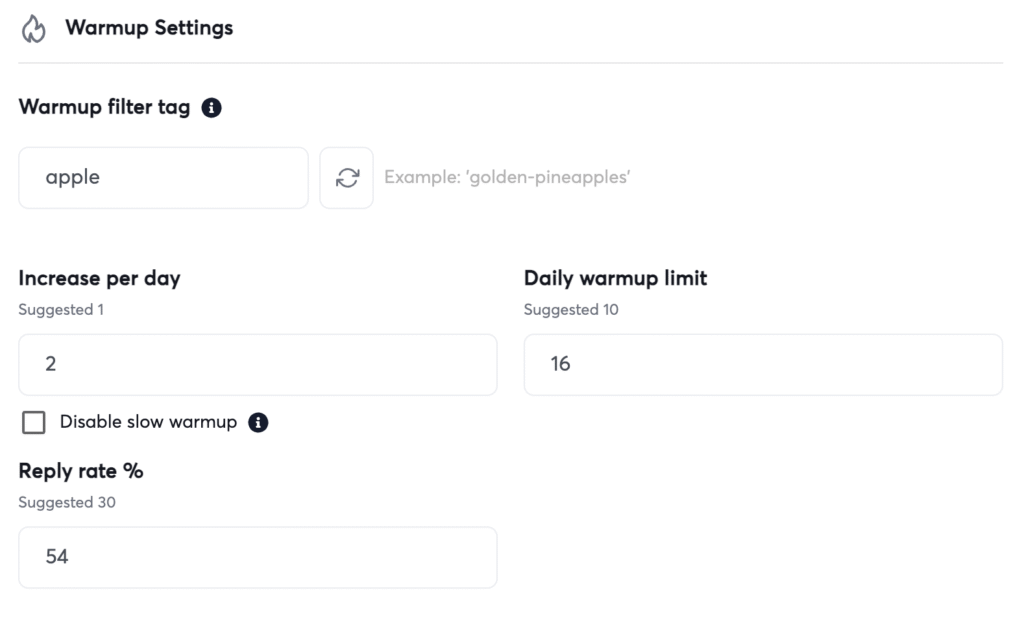
Phase 1 – Reputation Warm-Up (0 cold emails)
| Day | Emails / inbox | Ten-inbox total |
| 1 | 10 | 100 |
| 5 | 15 | 150 |
| 10 | 22 | 220 |
| 14 | 25 | 250 |
Goal: build sender reputation only - no prospects yet.
Phase 2 – Campaign Ramp (real outbound)
| Week | Cold emails / inbox / day |
|---|---|
| 1 | 10 |
| 2 | 12 |
| 3 | 15 |
| 4 | 22 |
| 5 → | 25 (cap) |
Rule: bump no faster than ≈ 15 % per week once past 15 sends.
Tool Stack Face-off
Compare features, pricing, and capabilities of the top email warm-up tools.
-
Reply Network40k
-
Gmail + Outlook Support
-
Auto SPF/DKIM Check
-
Custom Warm-up Settings
-
Reply Network20k
-
Gmail + Outlook Support
-
Auto SPF/DKIM Check
-
Advanced Analytics
-
Reply Network15k
-
Gmail + Outlook Support
-
Auto SPF/DKIM Check
-
Niche Specialization
| Feature | Instantly | MailReach | Mailwarm |
|---|---|---|---|
| Price / inbox | $12 | $25 | $29 |
| Reply network | 40k | 20k | 15k |
| Gmail + Outlook support | |||
| Auto SPF/DKIM check | |||
| Custom warm-up settings | |||
| Advanced analytics | |||
| Shared IP pools | |||
| Verdict | Best price-to-firepower | Good but pricey | Smaller niche |
5 | Inbox Rotation - Your Deliverability “Pressure Valve”
Even with pristine warm-ups, blasting 30, 40, 50 real outbound emails from a single address every day will attract throttling.
Our rule of thumb
- Cap real sends at 25/day per inbox.
- Spin up fresh inboxes (on warmed domains) before you’re tempted to exceed that.
- Rotate new campaigns across all inboxes - never let one address hog 3 days in a row.
Think of inbox rotation like tire rotation on a road trip: spread the wear, keep moving, avoid a blow-out.
6 | Content & List Hygiene
- One visible link before the fold.
- Keep HTML < 100 KB; shoot for 80 % text.
- Clay-generated first lines → +25 % opens.
- Verify leads; bounce < 3 %.
- List-Unsubscribe header satisfies Gmail/Yahoo, slashes complaints.
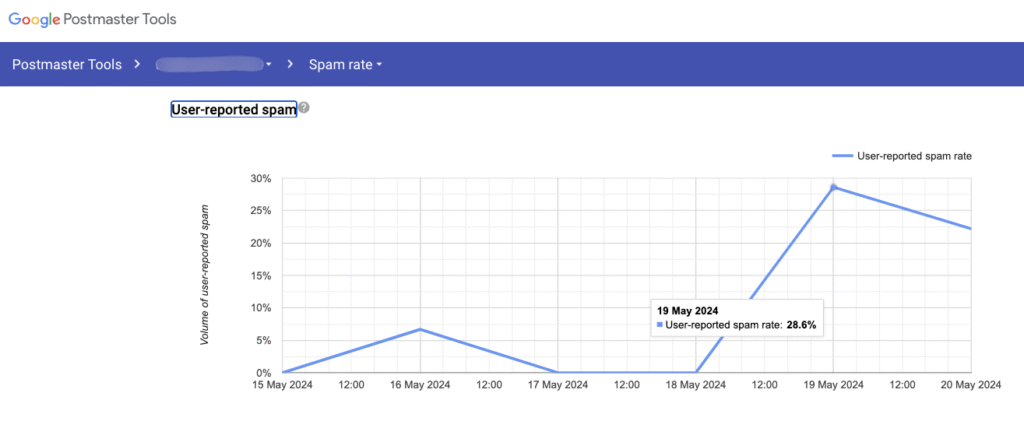
7 | Bounce & Complaint Management (Postmaster / SNDS)
- Kill any campaign that crosses 3 % hard-bounce.
- Gmail Postmaster: Spam Rate stays < 0.3 %.
- Outlook SNDS: same number, different dashboard.
8 | Benchmarks & Case Snapshot
| Segment | Open % | Reply % | Positive % |
| B2B Services (avg) | 45 | 6.2 | 53 |
| SaaS / Cloud | 37 | 4.8 | 52 |
| Agency-to-Agency | 41 | 5.5 | 48 |
Ongoing Internal Study: Warmed up ten HiveHCleaning.com inboxes, 14-day ramp, 0.1 % complaints
9 | Grab-n-Go Recap Checklist
Track your progress implementing the key email deliverability steps.
Let's Plan Your Next Steps Together.
Frequently Asked Questions
Q1: Do I really need DMARC if Gmail and Yahoo only “encourage” it?
A1: Yes. Even though it’s technically optional right now, DMARC alignment already feeds into sender-reputation scoring. Adding a simple p=quarantine policy proves you’re legitimate and cuts spoof attempts that can trash your domain health.
Q2: How often should I rotate or add new sending inboxes?
A2: The moment one address approaches its 25-email-per-day cap—or if spam rate creeps toward 0.2 percent - spin up a fresh inbox on a warmed domain. Think of inboxes like tires: rotate before they wear thin, not after.
Q3: Does sending on weekends hurt deliverability?
A3: No. Mailbox providers score engagement over a rolling window, so a Saturday batch won’t harm reputation if your list is healthy. Weekend sends just tend to book fewer calls.
Q4: Can I skip warm-up if I’m using a five-year-old domain?
A4: Age helps, but a dormant domain still looks “cold” to spam filters. Run at least a 7-day auto-warm sequence, then start real outreach at 10 emails per inbox per day.
Q5: What’s the quickest way to check if my emails are landing in spam?
A5: Send tests to seed Gmail, Outlook, and Yahoo inboxes, then inspect the headers for spam scores. For continuous monitoring, add your sender domain to Gmail Postmaster and Outlook SNDS - both dashboards are free.